What an MCP connector is
For a long time, AI apps mostly dealt in text. You pasted something in, they wrote something back, and you did everything else by hand. The models understood what you wanted better and better, but they couldn't reach your systems. An AI app could draft a quote for you, but it couldn't create it in your accounting.
You could connect every AI app to every tool individually. With ten AI apps and a hundred business tools, though, that would be a thousand integrations for someone to build, test and maintain. MCP solves this problem.
How MCP works
MCP stands for Model Context Protocol. It is an open standard for how an AI app talks to another system. The official documentation compares MCP to a USB-C port for AI apps: a vendor builds its side of the plug once. After that, every AI app that speaks the same standard fits.
Infinity provides a list of tools: find a contact, create an entry, send a quote, log working time. Each tool describes what it does and what information it needs. Your AI app reads the list and picks what it needs for your request on its own. There's nothing to program or set up. You write a sentence the way you would say it to someone on your team.
Your accounting becomes something you can talk to
Many vendors build an assistant into their own product. That helps as long as you're working in that product.
An MCP connector works the other way round. It makes your accounting reachable in the AI app you have open anyway. That app usually has other connectors attached too, such as your inbox, your calendar or your file storage. A single request can therefore touch several systems. We'll come back to that in a moment.
An open standard
Anthropic published the standard in November 2024. A year later, on 9 December 2025, it passed to the Agentic AI Foundation of the Linux Foundation, co-founded by Anthropic, Block and OpenAI and backed by Google, Microsoft, AWS, Cloudflare and Bloomberg. By then, more than 10,000 public MCP servers had been published. The standard is supported by Claude, ChatGPT, Cursor, Gemini, Microsoft Copilot and VS Code, among others.
So your accounting isn't tied to any one AI product. If you switch from ChatGPT to Claude next year, the connection keeps the same address.
Accounting happens everywhere except in the accounting
In accounting, connecting AI makes a particular difference, because it goes straight at the real bottleneck.
The quote comes out of the client meeting, the receipt out of the trip home, the project hour out of the work itself, the order out of the inbox. All of it gets recorded later, somewhere else, by hand. In between lies a gap. That is where most of the effort self-employed people complain about comes from: finding receipts, opening the accounting, typing everything up.
That is why putting off accounting is so common and so expensive. Anyone who doesn't record a receipt right away records it in March for the whole previous year. By then, half of them are missing.
There are two ways to close this gap. One makes bank transactions and receipts land in your accounting automatically as booking suggestions, instead of you hunting for them and typing them up. The other is an MCP connector. It turns your accounting into something other software can operate, and so makes it reachable wherever you happen to be working.
What this makes possible
It is easiest to show in three levels. You may already know the first in a watered-down form. The third previously took development work.
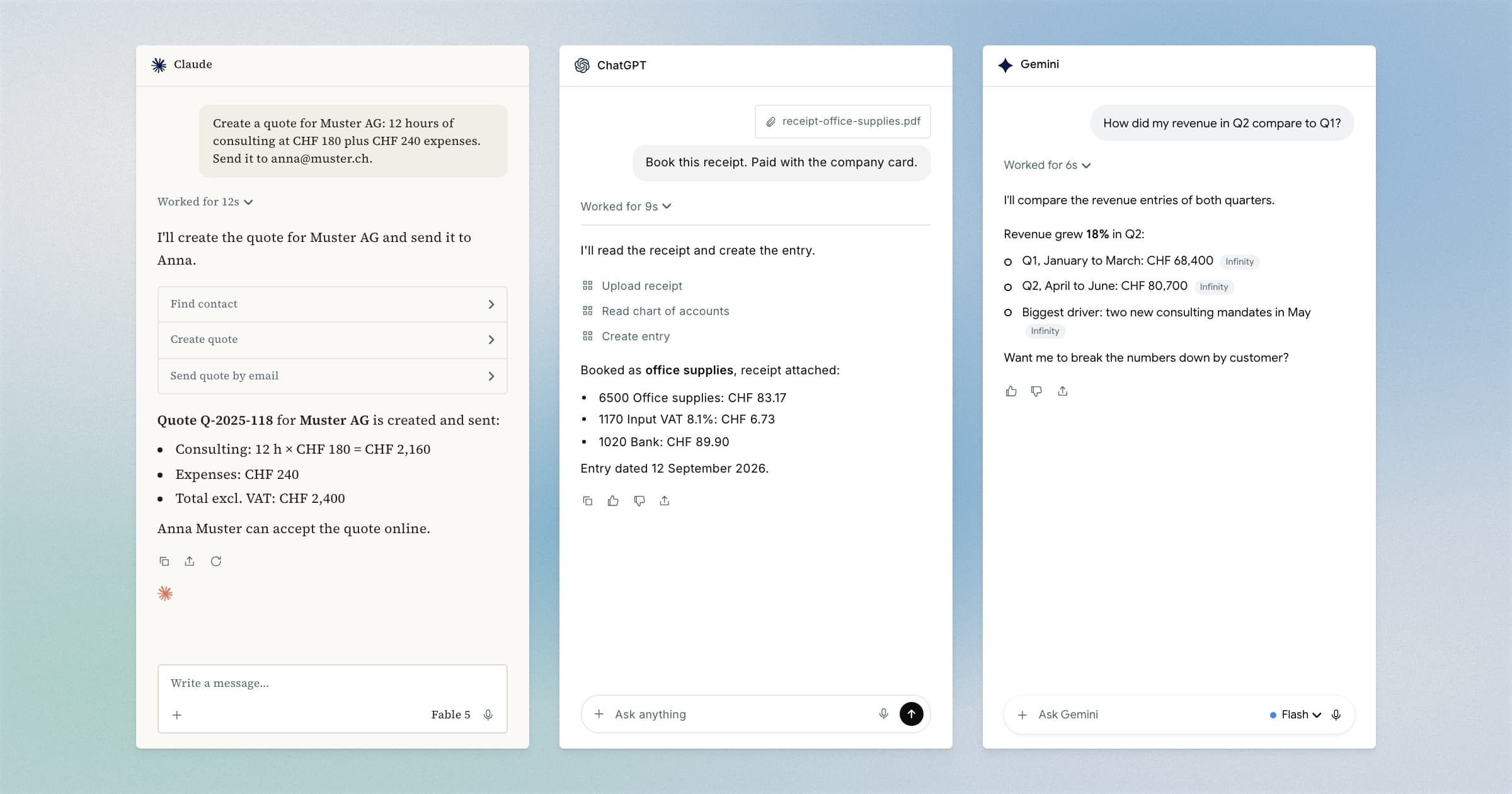
Level 1: Quotes and receipts in the chat
You're coming out of a client meeting and know what should go into the quote. That used to mean: open the accounting, find the contact, enter the line items. Now you write in your AI app:
Create a quote for Muster AG: 12 hours of consulting at CHF 180 plus CHF 240 expenses. Send it to anna@muster.ch.
The AI app finds the contact, creates the quote and sends it. The result is a regular quote in Infinity. You see it there like any other and can adjust or withdraw it.
The same goes for receipts. You drag a PDF into the chat and write:
Book this receipt. Paid with the company card.
The AI app reads the receipt, fetches your chart of accounts and creates the entry, input tax included. The receipt is then attached to the entry.
Level 2: Questions about your own numbers
Hardly anyone opens their accounting just to follow up a vague hunch. In the chat, the question takes five seconds:
How did my revenue in Q2 compare to Q1?
The answer comes from your actual entries, not from last week's export. And you can keep asking: break it down by client, look at the outliers, add the open receivables. That way you get answers to questions no report was built for.
Level 3: Several systems in one request
Besides Infinity, your AI app usually has other apps connected, such as Gmail, your calendar, Google Drive, Slack or Stripe. A single request can therefore link systems that know nothing about each other:
Read Lea's order in my inbox, add her as a contact and send the invoice.
The AI app finds the email, pulls out the details, creates the contact, creates the invoice and sends it. Three systems work together without anyone having to build an automation first.
The same pattern covers workflows you would once have needed an automation service and some patience for:
- Log client meetings from Google Calendar as project time and invoice them together at the end of the month
- Upload new receipts from a Google Drive folder and have them suggested as entries
- Match incoming Stripe payments to open receivables and book them
- Record orders and fees from Shopify as entries in the right period
- Ask about revenue or open invoices in the team's Slack and get the answer from the live accounting
- Log completed Asana tasks as work on the client project and bill them
You don't have to set up any of these workflows in advance. You describe the task when it comes up, and the AI app assembles the tools itself. That works even for cases you never saw coming.
What to think about first
Access that can write to your accounting deserves a few minutes of thought. It comes down to three things.
First: your data leaves Infinity. The AI app only receives what it needs for the specific request, never your whole accounting. What happens to it after that is governed by your AI provider's privacy policy. If you work on particularly sensitive client mandates, clarify this first.
Second: start with read access. You set per area whether the AI may only read or also write. A week of only asking questions shows you what you actually use the connector for. It is usually something other than you expected. After that, grant write access where it clearly pays off.
Third: payroll stays out. Payslips, ELM reports and the VAT return to the FTA are still done in Infinity itself. For tasks with a reporting obligation, that is the right division of labour.
Tip: Check the first entries that come from the connector the way you would check an entry from someone on your team. Everything the AI creates shows up in Infinity, where you can adjust or undo it.
Setup takes less than a minute
You copy the MCP server's address into your AI app and sign in with your Infinity login. Then you choose the organisation and set the permissions per area. No API token, no configuration file, nothing to install. Administrators of the organisation can set it up. The full guide is in the documentation under Connect a client.
The first built-in MCP connector
Infinity is the first Swiss accounting software with its own MCP connector.
If you wanted to connect your accounting to an assistant, you had to fend for yourself: generate an API token, run a third-party server on your own computer. Nobody had reviewed it, and nobody stood behind it. That was something for people who like to tinker.
With Infinity's connector, you sign in with your normal login. It runs on our servers. You grant permissions per area and can revoke them at any time. It is included in every plan, with no surcharge and no add-on, because access to your own data is not a premium feature.
For the first time, you can talk to Swiss accounting software out of the box, the way you talk to other business tools.
That this step comes from Infinity is no surprise. In 2023 we launched Switzerland's first AI accounting software. At the time, the industry still considered the topic a trend. Live Accounting connects your bank account and suggests entries in real time. Live Capture recognises receipts automatically instead of you typing them up. Instant Fill completes quotes based on past jobs. Your financial data stays on Swiss servers and is not used to train the AI models.
The MCP connector continues this line. With it, you can do your accounting outside Infinity too.
Its counterpart is Juno, the AI agent inside Infinity itself. Juno is currently in a closed beta and available to selected users. MCP works in both directions. Juno will in turn be able to access MCP servers, for example a CRM like HubSpot. Then Juno can reach the rest of your tools from inside your accounting as well.
Frequently asked questions
What is an MCP connector?
MCP is an open standard that lets AI apps access other tools. With Infinity's MCP connector, your AI app reads your accounting. If you allow it, it can also send invoices, create entries or log time.
Do I need technical knowledge for this?
No. You add the address in your AI app, sign in with your Infinity login and grant the permissions. After that, you describe tasks in plain sentences.
Which AI apps does Infinity work with?
All apps that support MCP connectors, including ChatGPT, Claude, Claude Code, Cursor, Codex, Gemini, GitHub Copilot, Grok, Windsurf, Raycast, Zed and n8n.
What does the MCP connector cost?
Nothing extra. It is included in every plan and needs no add-on.
Can the AI change my accounting on its own?
Only as far as you allow. Per area, you set whether the AI may only read or also write. Everything it creates shows up in Infinity, where you can correct or undo it.
Accounting where you already work
You no longer have to open your accounting to get something done. With an MCP connector, it comes to you. You can now reach your numbers in the chat. What you do with them is up to you.
Try Infinity free for 14 days, no credit card required. You'll find all the details about the connector on the MCP page and the plans on the pricing page.