The QR invoice has completely replaced the old red and orange payment slips. Since 1 October 2022, it has been the only permitted format for paper-based transfers in Switzerland and Liechtenstein. Anyone issuing an invoice in Switzerland today will inevitably encounter the QR payment part.
It sounds simple, but in practice the QR invoice raises a few questions: Do I need a QR-IBAN or is my regular IBAN enough? What is the difference between QRR, SCOR and NON? And what is changing with structured addresses in 2026? This guide explains everything step by step.
For the general mandatory information on a Swiss invoice, including VAT details, addressing and payment terms, see our complete invoicing guide.
Structure of a QR invoice
A QR invoice consists of two sections placed at the bottom of the invoice and separated by a perforation line or cutting mark:
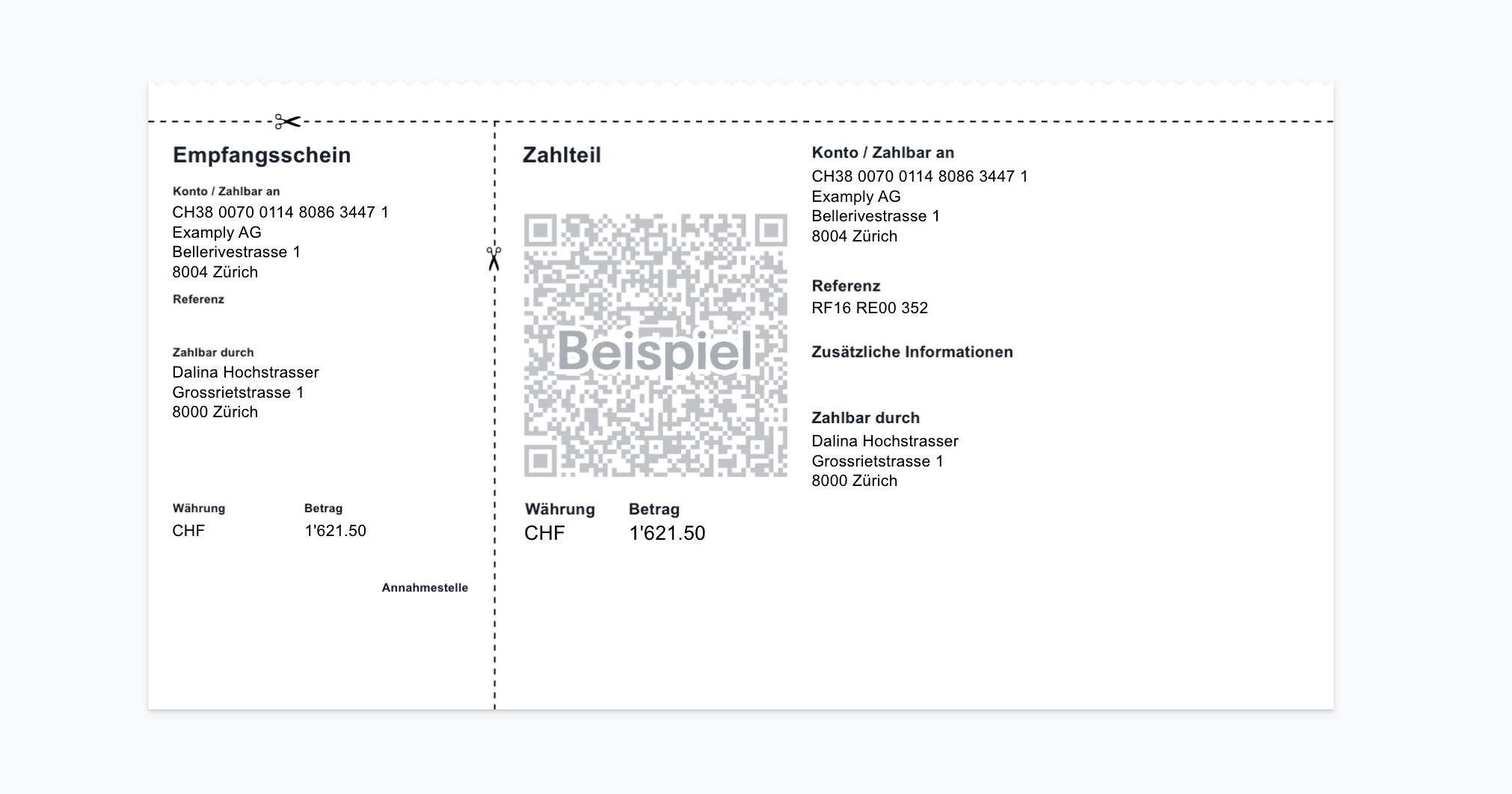
- The receipt (left) - a compact slip containing the most important payment details in plain text, which the recipient can detach as a receipt.
- The payment part (right) - contains the Swiss QR Code and all payment information in plain text. Banking apps scan the QR code and automatically fill in the payment details.
The Swiss QR Code itself measures exactly 46 × 46 mm and carries the Swiss cross in the centre as its identifying feature. No company logo or graphic may replace it. The code can contain up to 30 structured data fields, including the IBAN, amount, currency, payee address and, optionally, a reference number.
The data in the QR code must match the plain-text information on the payment part exactly. Deviations are not permitted and can cause the payment to be rejected.
What the Swiss QR Code contains
The QR code contains information including:
- IBAN or QR-IBAN of the payee
- Name and address of the payee (structured)
- Payment amount and currency (CHF or EUR)
- Name and address of the payer (optional)
- Reference number (depending on the type: QR reference, Creditor Reference or none)
- Additional information (e.g. invoice number as free text)
QR-IBAN vs. regular IBAN
This is one of the most common stumbling blocks. Not every IBAN works with every reference type, and an incorrect combination can cause the bank to reject the payment.
A regular IBAN is the account number you normally use for your banking transactions. It works for QR invoices without a reference (NON) or with an international Creditor Reference (SCOR).
A QR-IBAN is a special IBAN variant that your bank provides in addition to your regular IBAN. You can identify it by the institution identification (IID) in the range 30000-31999, which corresponds to digits 5 to 9 of the IBAN. The QR-IBAN enables the 27-digit QR reference (QRR), allowing incoming payments to be automatically matched to the correct outstanding invoice in e-banking.
You can request a QR-IBAN from your bank, usually free of charge through its e-banking portal. The money still ends up in your regular account; the QR-IBAN is simply a virtual routing account used to match references.
The golden rule: A QR-IBAN always goes with a QR reference (QRR). A regular IBAN always goes with SCOR or NON. Mixing up these combinations is the most common QR invoice error and leads to immediate rejection.
Comparing the three reference types
The QR invoice supports three variants, which differ in how the payment is matched to the recipient. The right choice depends on whether you need automatic matching and whether you invoice internationally.
| Feature | QRR (QR reference) | SCOR (Creditor Reference) | NON (no reference) |
|---|---|---|---|
| IBAN type | QR-IBAN (mandatory) | Regular IBAN | Regular IBAN |
| Reference format | 27 digits, modulo 10 check digit | ISO 11649, starts with "RF" | None |
| Automatic matching | Yes - in Swiss e-banking | Yes - also within the SEPA area | No - manual matching |
| Can be used internationally | No (CH/LI) | Yes (SEPA-compatible) | Yes |
| Suitable for | SMEs with many invoices | Companies with EU customers | Individual, simple invoices |
For most Swiss freelancers and SMEs, QRR is the best choice: automatic matching saves noticeable time once you issue more than five invoices per month. If you also invoice in euros or have customers in the SEPA area, SCOR is the better option. NON is the simplest choice, but you have to match incoming payments to the correct invoice manually.
What you need before you start
Before creating your first QR invoice, you should clarify the following requirements:
- Bank account with an IBAN at a Swiss bank, plus a QR-IBAN for automatic matching if required (usually available free of charge through e-banking)
- Your company's complete, structured address (street, house number, postcode, city, country code CH)
- A decision on the reference type: QRR, SCOR or NON, matching your IBAN
- VAT number in the format CHE-123.456.789 VAT, if you are registered for VAT
- A tool that generates standards-compliant QR invoices. Building the QR code manually is error-prone and not recommended
Create a QR invoice step by step
Once the requirements are in place, creating a QR invoice is straightforward, provided you use a tool that generates the Swiss QR Code in accordance with the standard.
1. Enter the payee details
Enter your full company name and address. The address must be structured: street, house number, postcode, city and country code must be separate fields, not a single free-text line. Add your IBAN or QR-IBAN as well.
2. Add customer details and invoice items
Enter the customer's name and address, also in structured form if you want to include it in the QR code, together with the invoice items, individual prices, quantity and, if you are VAT-registered, the correct VAT rate.
3. Generate the reference number
If you use a QR-IBAN, your invoicing software automatically generates a 27-digit QR reference with a check digit. With SCOR, it creates an ISO 11649 reference starting with "RF". If you use no reference (NON), this step does not apply.
4. Check and send the QR payment part
The tool generates the QR payment part with the receipt and payment section at the bottom of the invoice. Before sending it, check: Does the plain-text information match the data in the QR code? Is the address structured? Is the QR code exactly 46 × 46 mm and does it contain the Swiss cross? If everything is correct, send the invoice by email as a PDF, by post or via a link.
Common mistakes when creating QR invoices
According to SRF, around 6,000 faulty QR invoices are submitted at Swiss Post every month. The most common causes are:
- Incorrect IBAN/reference combination: QR-IBAN with SCOR or regular IBAN with QRR. Both are rejected.
- QR code too small or distorted: exactly 46 × 46 mm, aspect ratio 1:1.
- Company logo instead of the Swiss cross in the QR code: only the Swiss cross is permitted.
- Missing separation line between the payment part and the invoice body.
- Unstructured addresses in the QR code: no longer permitted since November 2025.
Structured addresses: What changed in 2025/2026
Since 21 November 2025, version 2.3 of the SIX Implementation Guidelines for the QR invoice has applied. The most important change: Only structured addresses (address type "S") are permitted in the Swiss QR Code. Unstructured addresses (address type "K"), where the street, postcode and city were placed in a single free-text line, are no longer permitted when creating new QR invoices.
In practical terms, every address component, including street, house number, postcode, city and country, must be stored in a separate field in the QR code. This applies both to the address of the invoice issuer and to the payer's address, if provided.
Important: Since November 2025, new QR invoices may only contain structured addresses. A transition period for processing older QR invoices with unstructured addresses runs until 30 September 2026. After that, banks may reject payments containing non-compliant addresses. Check now whether your invoicing tool generates structured addresses.
What comes next? IG 2.4 from November 2026
SIX has already announced the next version of the Implementation Guidelines: QR Invoice IG version 2.4 will be introduced with the SIC release on 13 November 2026 and will replace version 2.3. There are no technical changes for invoices in Swiss francs. The new rules primarily affect euro invoices and international payments. Version 2.3 remains valid until November 2027.
Create a QR invoice for free or with software
Free tool for individual invoices
Some banks offer a QR payment section generator directly in their e-banking. Websites such as qr-rechnung.net also allow you to create an individual QR payment section. In this case, make sure to include a complete invoice with all legally required information.
If you want to create, send and manage invoices directly, you can try Infinity free for 14 days. QR invoices are automatically created with the corresponding QR payment section.
Invoicing software for everyday use
If you issue invoices regularly, invoicing software can save considerable time. Customer master data, product templates and recurring receivables can be saved and reused. The QR reference is generated automatically, structured addresses are enabled by default, and every receivable is posted directly to the accounts.
With Infinity, you can create QR invoices and quotes in a visual editor, send them by email or link, and immediately see which receivables are open, paid or overdue. You configure the QR-IBAN and reference type once. After that, Infinity generates every QR invoice in accordance with the standard, including structured addresses and the correct Swiss QR Code.
Try Infinity free for 14 days. Unlimited quotes and invoices, no credit card required.
Frequently asked questions
Do I need a QR-IBAN or is my regular IBAN enough?
It depends on whether you need automatic payment matching. With a QR-IBAN and QR reference (QRR), your e-banking automatically matches incoming payments to the correct invoice. With a regular IBAN, you can create QR invoices without a reference (NON) or with a Creditor Reference (SCOR). You either have to match payments manually or use the international SCOR reference. From around five invoices per month, a QR-IBAN is worthwhile.
Where can I get a QR-IBAN?
From your bank, usually free of charge through its e-banking portal. The QR-IBAN is a virtual routing account, so the money still ends up in your regular account. Every Swiss bank that participates in the QR invoice system offers a QR-IBAN.
What happens if I combine a QR-IBAN with a SCOR reference?
The payment is rejected. A QR-IBAN must be used with a QR reference (QRR). A regular IBAN must be used with SCOR or NON. This rule is hard-coded into the banking system, so an incorrect combination will not be processed.
Can I send a QR invoice by email?
Yes. Sending the invoice as a PDF attachment is common. The recipient can scan the QR code directly from the screen using a banking app. Alternatively, some invoicing tools let you send a link that allows the customer to open the invoice in their browser.
What exactly is a "structured address"?
A structured address (type S) stores each address component in a separate field: street, house number, postcode, city and country. By contrast, the old unstructured address (type K) combined everything into one or two free-text lines. Since November 2025, only structured addresses are permitted when creating new QR invoices.
Does the QR invoice also work for customers abroad?
You can send a QR invoice to people abroad. However, foreign banks generally do not support scanning the Swiss QR Code, so the payment has to be entered manually. For international customers, the SCOR variant with a regular IBAN is recommended because the Creditor Reference also works within the SEPA area.